• Articles coming soon
    • Articles coming soon
    • Articles coming soon
    • Articles coming soon

Steps:

  1. MT5 has a built-in facility of supporting mobile alerts and can send alerts to MT5 mobile apps. VATA uses the same facility. To use this facility you must first configure MT4 in a proper way. This set-up has nothing to do with VATA and of part of the standard MT5 set-up. So google it if needed.
  2. Make sure that you have MT5 running on Windows all the time. If an Internet connection is lost or the computer shuts down you will not receive alerts as they are sent by Windows MT4 directly. If you think you will lose internet connection, power or computer connectivity the best way is to rent a cheap VPS and run your MT5 there without any interruptions. VPS (Virtual Private Server) is a cheap remote Windows computer that you hire but do not own. It runs an efficient and robust infrastructure. It has high-speed internet connectivity. We recommend these VPS providers.
  3. This video shows how to set up mobile alerts in general in MT5 app:
    video
    play-rounded-fill
  4. This video shows how to set up email alerts with MT5:
    video
    play-rounded-fill
  5. Once this config is ready, go to Dashboard or respective VATA indicators and switch the Alert setting on. See the settings guide which came in the package that you downloaded. It has details on alert settings. The settings guide can also be found here:
  6. Here is how is it supposed to be used:
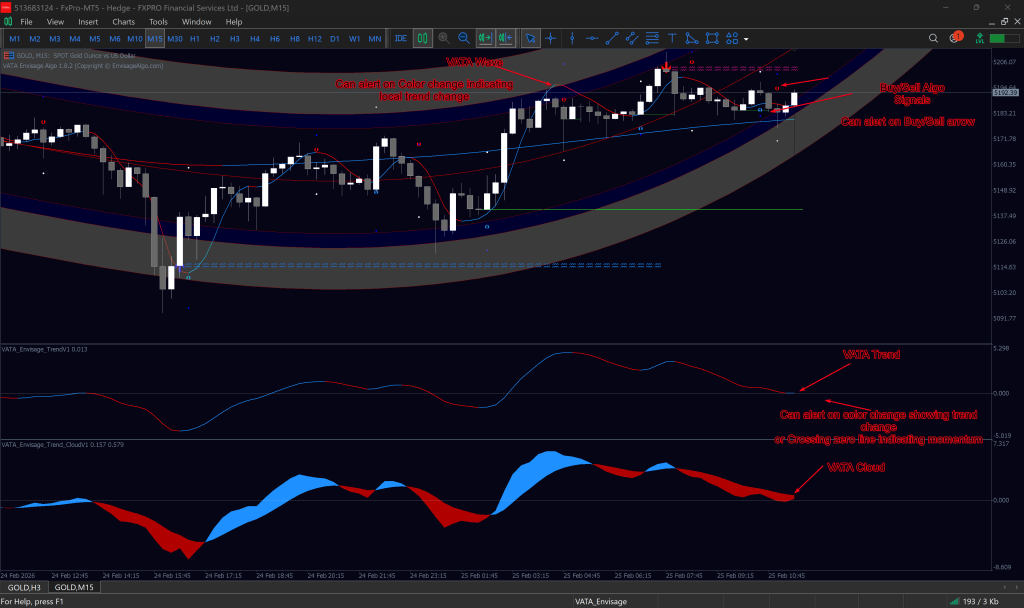
    1. There are several components as you probably are already aware i.e. VATA Trend, VATA Signal, VATA Wave. Nearly all components can send alerts. You should configure them as per your requirements.
    2. VATA trend can alert if you wan to get an alert on trend change or momentum (cross zero line)
    3. Buy/Sell arrow alert by VATA algo shows a possible buy or sell entry opportunity
    4. VATA Wave alert to indicate local trend change
    5. Make sure you set alerts only based on what you want. We suggest to set VATA Trend alert as it indicates that trend is shifting. This will give you a possible opportunity to place a buy/sell trade one VATA Algo arrow alert has also come in. So additionally you can also have that Buy/sell arrow alerts if you want.
    6. This will work like this logically:

      1. Trend changes and alerts
      2. Buy/Sell arrow alert comes in the direction of Trend change
      3. You change the charts and if all looks good as per your requirement, you plan a trade.
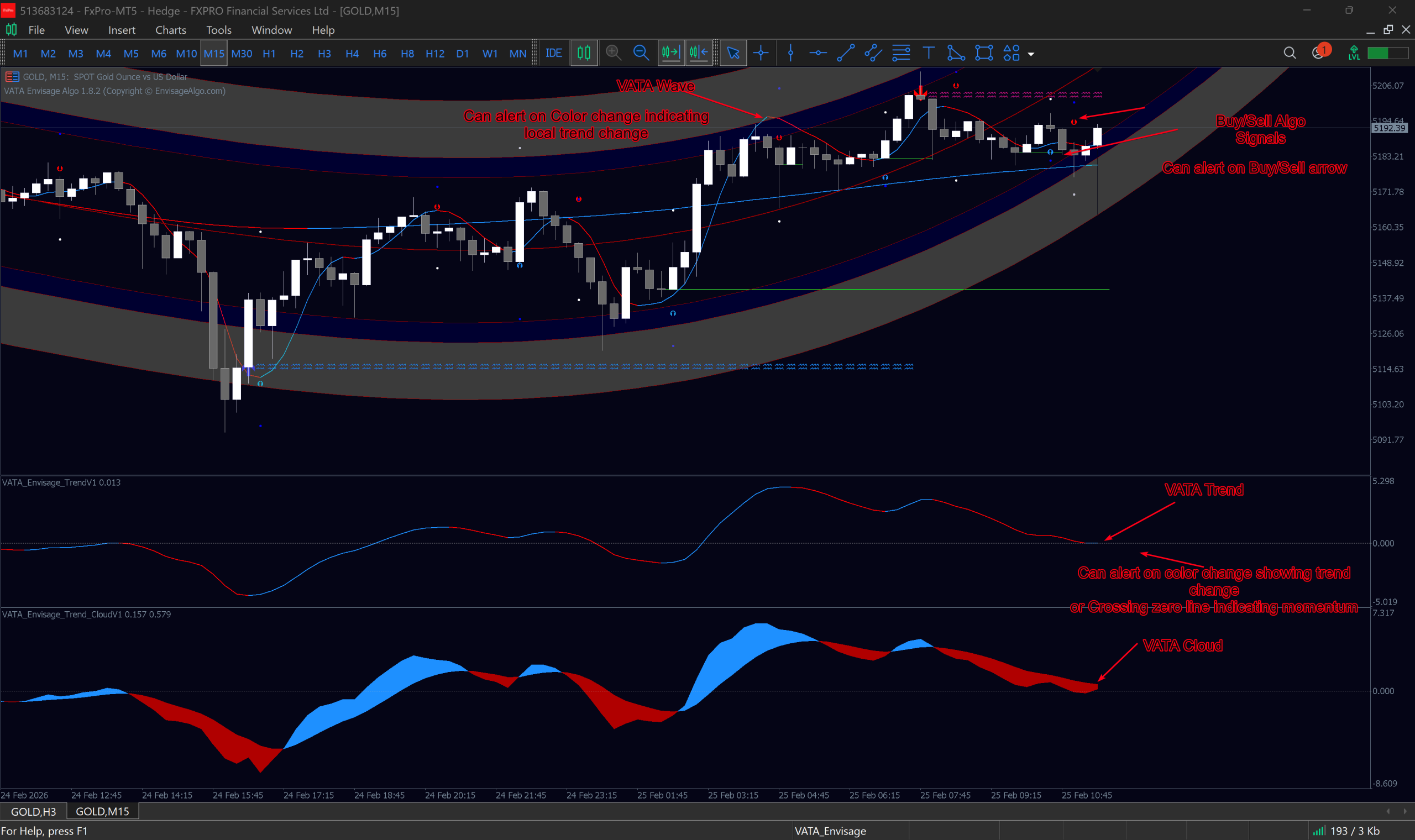
Table of Contents

EnvisageAlgo is a cutting-edge trading software technology company helping traders around the world.

CONTACT US

Kemp House, 124 City Road, London United Kingdom

support@envisagealgo.com

Copyright © 2025 EnvisageAlgo.com/Vikinsa.com. All rights reserved.

SIGN UP FOR EMAIL UPDATES

Sign up with your email address to receive news and updates

Trading is risky and many will lose money in connection with trading activities. All content on this site is not intended to, and should not be, construed as financial advice. Decisions to buy, sell, hold or trade in securities, commodities and other markets involve risk and are best made based on the advice of qualified financial professionals. Past performance does not guarantee future results.

Hypothetical or Simulated performance results have certain limitations. Unlike an actual performance record, simulated results do not represent actual trading. Also, since the trades have not been executed, the results may have under-or-over compensated for the impact, if any, of certain market factors, including, but not limited to, lack of liquidity. Simulated trading programs in general are designed with the benefit of hindsight, and are based on historical information. No representation is being made that any account will or is likely to achieve profit or losses similar to those shown.

Testimonials appearing on this website may not be representative of other clients or customers and is not a guarantee of future performance or success.

As a provider of technical analysis tools for charting platforms, we do not have access to the personal trading accounts or brokerage statements of our customers. As a result, we have no reason to believe our customers perform better or worse than traders as a whole based on any content or tool we provide.

Charts used on this site are by MetaTrader and TradingView in which the majority of our tools are built on. MetaTrader®, MT5®,MT4® and TradingView®are registered trademarks of their respective companies. These firms have no affiliation with the owner, developer, or provider of the Services described herein.

This does not represent our full Disclaimer. Please read our full disclaimer.

© 2025 EnvisageAlgo.com

Hide picture